SpeakOn 2.2.38 — smarter translation with your own Gemini key, and sounds you can trust
SpeakOn 2.2.38 is available today for Windows and macOS. It's the first release that moves past "plain" translation, and it fixes something riders kept telling me about: not knowing whether the app was still working after they pressed the key.
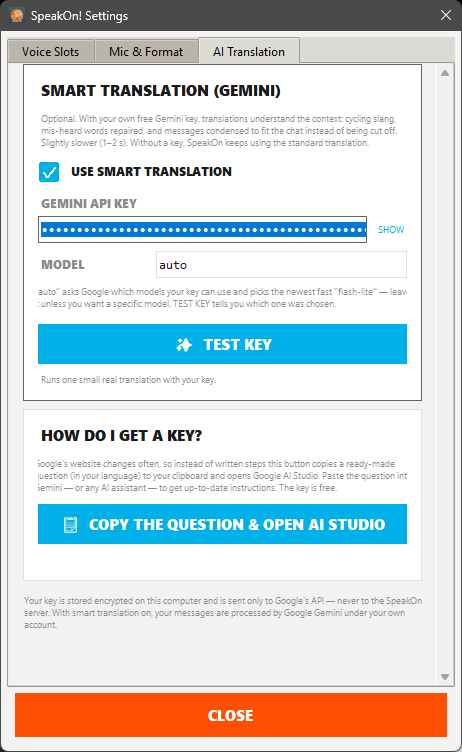
Smart translation, with your own key. Until now SpeakOn translated your words literally, through Google Translate. That works, but it doesn't know you're on a bike. Version 2.2.38 can hand the job to Google Gemini, and it tells Gemini exactly what's going on: this is Zwift chat, the text came from speech recognition (so a misheard word is likely), keep cycling slang as it is, and stay within the chat's character limit. The result is a message that reads like something a rider would type, not a dictionary entry.
There's one catch, and it's deliberate: you use your own Gemini API key. I can't hand out a shared key to everyone (it would run dry in a day), but Google gives each person a free key with a generous quota, more than enough for a season of group rides. Paste it in Settings → AI Translation, press "Test key", and you're done. The key is stored encrypted on your computer and never leaves it except to talk to Google.
Not a developer? No problem. Google's console changes every few months, so instead of writing instructions that go stale, SpeakOn does something different: one button copies a short question in your language ("I need a free Gemini API key, I'm not a developer, explain step by step…") and opens Google AI Studio. Paste the question into Gemini and follow the answer, which is always current. If you'd rather not bother, nothing changes: without a key SpeakOn keeps translating exactly as before.
Sounds you can trust. Thanks to feedback from Thorsten, the audio cues were redesigned twice. First the start and send sounds became clearly different (a single tick versus a rising three-note chime). Then, in 2.2.38, every sound was moved to the moment it actually means something: a tick when the mic opens, a soft "got it" pop when it closes, the chime only when your text is really in chat, a low thud if nothing went out, and a quick double-clunk if you press the key while the previous message is still being processed. With AI translation taking a second longer than the plain one, this matters: you hear that SpeakOn is working, and you stop pressing the key twice.
Also in this release. The "press to start, press again to send" recording mode for noisy trainers is now part of the standard download, with a short countdown before the safety limit; the status line says "Translating (AI)…" when Gemini is at work; and the Mac build script no longer trips over a sleeping Google Drive.
SpeakOn is free, for Windows and macOS. Download 2.2.38 from the SpeakOn page (the previous release stays available as a fallback), and tell me how it rides. Every improvement in this release came from someone writing to me.